


TruckMap - Truck GPS Routes
4.33.93K Reviews
App Specs
- Version
- 8.0.12
- Updated On
- License
- Free
- Downloads
- 500,000+
- Developer
- Tenstreet
- Categories
- Maps & Navigation
- Platform
- Android, iOS
Screenshots
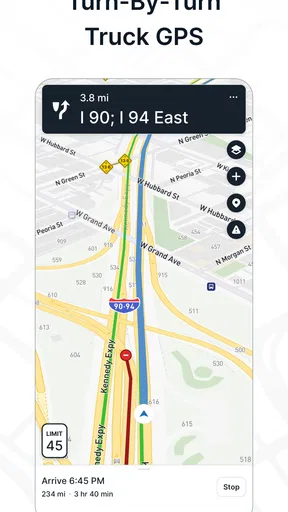
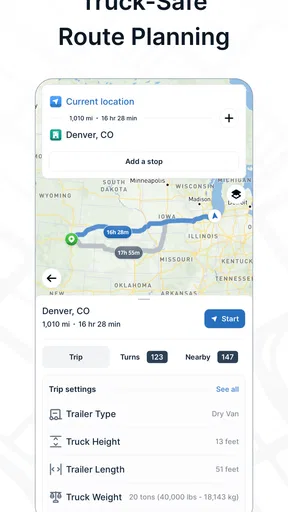
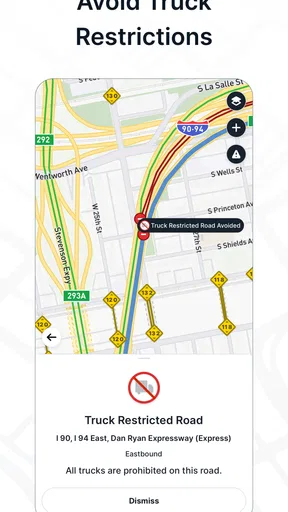
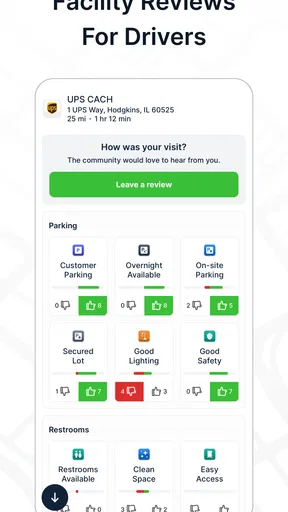
 Analysis by AppCompare
Before a truck navigation app proves itself, I want to know how it behaves when the route needs attention: while traffic changes, when I’m choosing a place to stop, and when the phone’s connection is less dependable than the road. TruckMap - Truck GPS Routes is aimed at those working behind the wheel, and its truck-focused approach gives it a different job from a general map app. I’d treat it as a practical planning companion, while still checking important turns and restrictions against the road and my own vehicle details.
Where a connection matters most
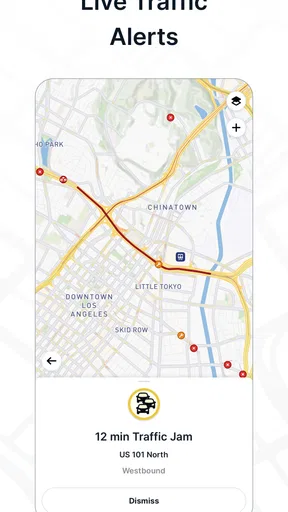
Navigation is not one single task. A route can be planned before departure, followed turn by turn, and adjusted when traffic or a stop changes the day. The app’s traffic updates are most useful in that last situation: they can help me reconsider a route rather than discover a delay only after reaching it. That benefit depends on timely network access, so I would not build a tight schedule around the assumption that every alert will arrive exactly when needed.
There is a useful distinction between having a route on screen and having the latest picture of conditions. A route may remain helpful as a reference while a connection is unreliable, but I would want current traffic information before making a significant detour. If service drops, my sensible response is to follow road signs, keep the planned destination in mind, and wait until the map refreshes before trusting a new alternative.
Using it in a working day
A realistic use case is a driver setting a destination and vehicle details before leaving a yard, then checking the route and likely stops while parked. During the drive, the screen’s stated focus on route, ETA, and upcoming stops should make quick glances more useful than digging through layers of unrelated information. I would set up the trip before moving, not while steering through a busy interchange; a clear interface is no substitute for safe attention.
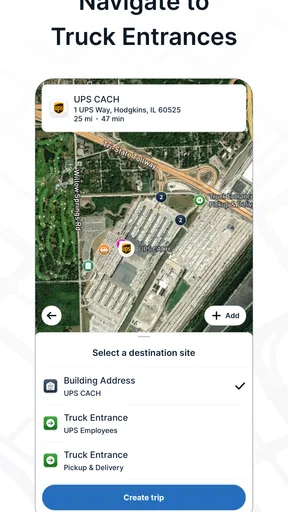
The same planning approach helps when the delivery time is uncertain. If traffic changes the ETA, I can use that as a reason to reassess a break or contact the receiving location, rather than assuming the original arrival estimate is guaranteed. For a new or awkward destination, I would review the final approach in advance. Truck-oriented routing can guide the trip, but local access, temporary signs, and site-specific instructions still deserve a driver’s judgment.
For data-conscious use, the practical habit is to do the work that needs a steady connection before departure: enter the destination, review the route, and identify a sensible stop. I would avoid repeatedly reopening or refreshing the map just to check details that have not changed. That is not a claim about a particular data-saving mode; it is simply a way to limit unnecessary phone use and keep attention on driving. A stable mount, readable screen settings, and a charger are also more useful than trying to manage a phone in hand on the road.
Who benefits, and where another tool may fit
This is most appealing to professional drivers and owner-operators who need routing shaped around a truck rather than a passenger car. It may also suit someone who drives a large vehicle occasionally and wants truck-oriented route planning. A person driving a regular car, making short local trips, or already relying on an employer’s dedicated navigation system may find a general map app simpler for everyday directions.
Worth Reading Before You Choose

EA SPORTS FC Mobile 26 Is a Bigger Football Game, but It Takes Time

Flipboard Shows What News Apps Must Do Beyond the Feed

Switching to Android Auto Means Rethinking Your Driving Routine

Google Calendar Makes a Crowded Week Easier to Manage

Ludo King Makes the Most of the Minutes Between Plans

Baby Panda World Brings Quick Play to Modern Phones, but Its Game Library Feels Busy
Compared with ordinary navigation apps, TruckMap’s value is its truck-specific purpose and the planning context around stops, restrictions, and compliance. A general map may be more familiar for a quick trip or a walk to a nearby business, but familiarity alone does not make it the better choice for a large vehicle. Conversely, a dedicated fleet system may be preferable when a company requires a particular workflow or centrally managed directions. I would see TruckMap as a useful independent option, not as automatic authority over dispatch instructions or posted road rules.
There are trade-offs. Truck-specific routing is only as useful as the vehicle information entered and the relevance of the route to the actual load and road conditions. I would double-check dimensions and weight rather than treating setup as a formality. Roadworks, temporary restrictions, and a destination’s private access can also complicate an otherwise sensible route. The app can reduce planning friction; it cannot make every road situation predictable.
The Perfect Co-Pilot
First off, the interface of TruckMap - Truck GPS Routes is super intuitive. You don’t have to be a tech wizard to navigate it, which is a huge plus when you're trying to focus on the road. The app's main screen is clean and straightforward, displaying only the necessary information. You’ve got your route, ETA, and any upcoming stops clearly laid out. It’s everything you need at a glance, without the clutter.
Custom Routes for Trucks
One of the standout features is the app’s ability to create custom routes based on your truck’s size and weight. No more worrying about low bridges or weight-restricted roads. The app allows you to input your vehicle’s dimensions and then tailors the route accordingly. This feature alone can save you from a lot of potential headaches and detours.
Another cool aspect is the live traffic updates. We all know how frustrating it can be to get stuck in a jam, especially when you’ve got a deadline. With TruckMap, you’ll get real-time traffic alerts, allowing you to adjust your route on the fly. It’s like having a personal traffic assistant riding shotgun.
Finding the Best Stops
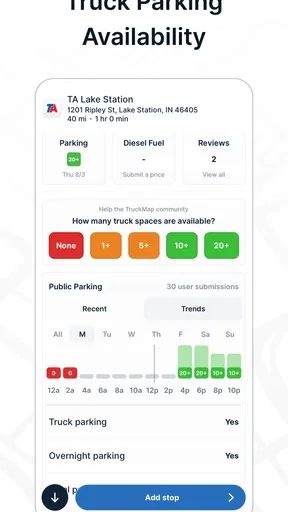
Let’s talk about finding those all-important rest stops. TruckMap doesn’t just direct you to the nearest gas station; it helps you find truck-friendly stops. Whether you need a place with ample parking, a restaurant, or a rest area, the app’s got you covered. It even lets you know which stops have amenities like showers or Wi-Fi, which is a nice touch when you’re planning your breaks.
On top of that, the app includes a comprehensive list of truck stops across the U.S. So wherever you’re headed, you can be sure you’ll find a place to recharge both yourself and your truck.
Keeping You Compliant
Now, let’s not forget about compliance. The app offers features like HOS (Hours of Service) tracking. This is huge for staying on top of regulations and ensuring you’re not violating any driving limits. It’s like having a digital logbook, minus the hassle of paperwork. Trust me, anything that cuts down on admin time is a win in my book.
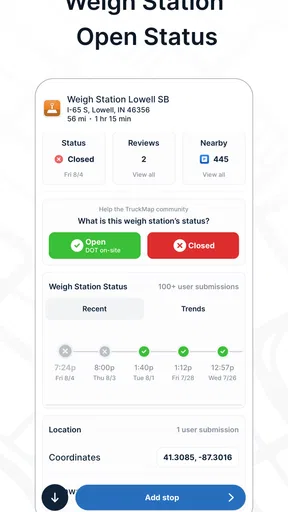
The map also displays weigh stations and alerts you to upcoming inspections, so you’re never caught off guard. It’s these little touches that make TruckMap feel like it was designed by truckers, for truckers.
Easy on the Wallet
TruckMap is a free Maps & Navigation app from Tenstreet, and its 4.88.0 version has a 9-or-later OS requirement. Its Everyone age rating makes it broadly accessible, while the app’s focus remains firmly on truck drivers. It has a 4.3 average from around 8,100 ratings, with roughly 3,800 written reviews and over 500,000 installs. Those figures suggest a well-used option, but I’d still judge it by whether its routing fits my vehicle and working routine.
The app was released on December 31, 2018, and its core appeal is not simply that it costs nothing. It brings route planning, truck stops, traffic context, and work-related map details together. I’d still check the current app experience and any optional purchase details before relying on a specific feature or building a daily workflow around it; a free download does not mean every driver will need or use every part of the app.
For someone trying it for the first time, I’d start with one familiar route rather than a difficult delivery. Enter the vehicle information carefully, compare the suggested path with a route you already know, and see whether the stop choices are useful for your schedule. That low-risk trial makes it easier to spot setup mistakes before they matter on an unfamiliar road.
When the route needs a second opinion
One question I’d ask before depending on any truck navigator is whether it replaces the driver’s own checks. My answer is no. A route suggestion is a planning aid, not permission to ignore a low-clearance sign, a closure, or a direction from a site. The vehicle profile is especially important: even a well-designed truck route can be unsuitable if the entered dimensions or weight do not reflect the vehicle being driven.
I’d also treat the stop information as a way to shortlist options, not a guarantee that a space will be available when I arrive. On a busy day, it makes sense to identify a backup stop before leaving, particularly if a break has to happen within a narrow window. That small habit is more useful than assuming the nearest result will always work for the truck, the timing, and the driver’s needs.
For connectivity, my verdict is practical rather than absolute. Traffic updates and any route changes that rely on current information are naturally more useful when the phone has a dependable connection. When reception is weak, I would avoid making a last-second reroute based on stale information and use signs and safe stopping places to regain context. Drivers whose routes regularly pass through areas with poor service should test their own routine in advance and keep an independent plan for critical legs.
My take for truck drivers
Let’s talk dollars and cents for a second. TruckMap is free to download, which is always a bonus. There are some in-app purchases available, but even without them, you’re getting a lot of bang for no buck. It’s great to see an app that offers so much value without a hefty price tag.
Overall, TruckMap - Truck GPS Routes is a game-changer. It’s reliable, user-friendly, and packed with features that make life on the road a whole lot easier. Whether you’re a seasoned trucker or just starting out, this app is definitely worth checking out. So why not give it a spin and see how it can transform your driving experience?
My recommendation is a little more specific: give it a try if truck-aware routing and practical stop planning would improve your day, but verify the route before treating it as final. Drivers who need only ordinary car directions may be happier with a familiar general map, while those under a company’s required navigation process should follow that system first. For everyone else, TruckMap can be a helpful co-pilot when paired with careful setup, sensible connectivity habits, and the judgment that still belongs to the person in the cab.
Pros
- User-friendly interface for easy navigation.
- Includes truck-specific route planning.
- Displays live traffic updates and alerts.
- Offers fuel station and rest stop info.
- Customizable to fit truck dimensions.
Cons
- Limited offline map capabilities.
- Some regions lack detailed mapping.
- Occasional app crashes reported.
- Battery drain on prolonged use.
- Requires constant internet connection.
FAQs for TruckMap - Truck GPS Routes
What features does TruckMap offer for truck drivers?
TruckMap provides several features tailored specifically for truck drivers, including real-time GPS navigation, optimized truck routes, and information on truck-friendly stops. It also offers updates on weigh stations, rest areas, and fuel prices. The app is designed to enhance safety and efficiency by avoiding low bridges and restricted roads.
Is TruckMap free to use, or are there in-app purchases?
TruckMap is free to download and use, offering a robust set of features without any cost. However, for enhanced functionality, such as advanced traffic data or premium route options, there may be in-app purchases available. These extras are optional and cater to specific needs.
How accurate is the GPS navigation in TruckMap?
TruckMap’s GPS navigation is highly accurate, leveraging real-time data to provide reliable and up-to-date route information. The app relies on a combination of user feedback and data from various sources to ensure that routes are current and account for truck-specific restrictions like weight limits and bridge heights.
Can TruckMap be used offline, and how does it handle connectivity issues?
TruckMap does offer offline capabilities, allowing users to download maps and routes in advance. This feature is particularly useful in areas with poor connectivity. While some features may require an internet connection for real-time updates, essential navigation functions remain accessible offline.
What platforms is TruckMap available on, and are there any system requirements?
TruckMap is available on both Android and iOS platforms. The app requires a device running Android 5.0 or later or iOS 10.0 or later. It’s compatible with most smartphones and tablets, ensuring a wide range of users can access its features without significant hardware limitations.


